
- Klimov☕
- Flávia☕
- Jonathan☕
- Ivan☕
- Hotctime☕
GAME TRANSLATE · SNES · ENGLISH PATCH v1.6
Granhistoria
English Translation
Banpresto’s 1995 Super Famicom RPG about a soul given twenty years to rewrite a continent’s history, now playable in English from the first night in Irai to the final switch. The patch also adds something the original never had: a map screen for every dungeon.
 Play it in your browserPlayground · add your ROM, the patch is applied for you
27EB2CF0Loading the patcher…
Your files stay on your device: everything happens in your browser, nothing is uploaded.
- Fixed
- Fixed
- Fixed
Show 2 more
- Fixed
- Fixed
About the game
 YouTube video player
Granhistoria: Genshi Sekaiki opens on the night before a wedding. Tor, a young man of the village of Irai, is murdered by the Heretic Bandits, and a soul from outside this world is sent into his body by a strange talking book, the World Chronicle. The Chronicle knows how the history of the Gran continent will go, year by year, and how it ends: in ruin, twenty years from now.
From 805 to 825 you live through that history one year at a time: as a bandit, a knight of Asashina, a king, and later a stranger in a new body. Each year brings a disaster the Chronicle wants you to stop, and each choice rewrites the timeline: who lives, who joins you, which kingdoms go to war. Between the gods of Za and Ge, angels, bandits and a man in black who seems to know exactly what you are, very little is what it first appears.
Screenshots
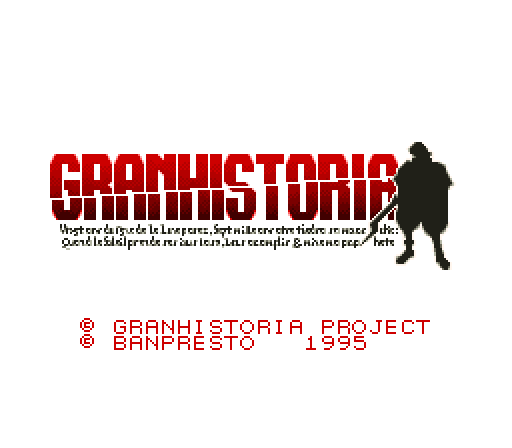
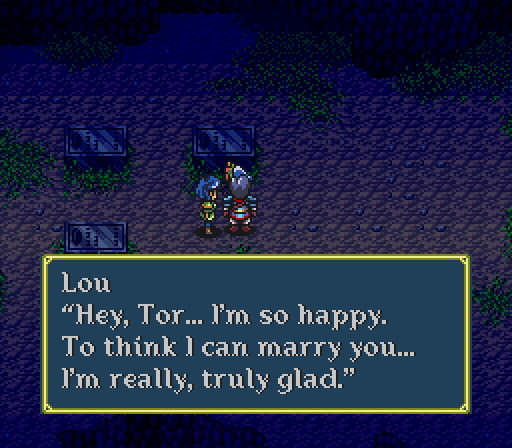
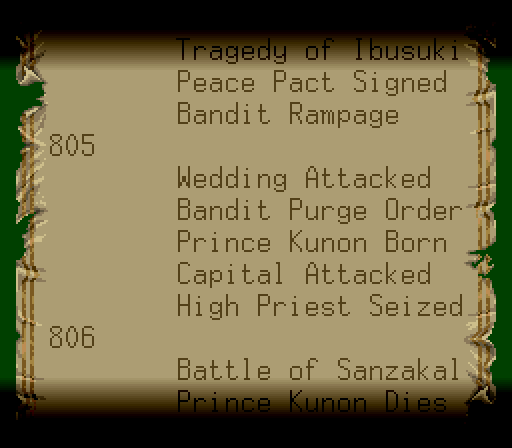
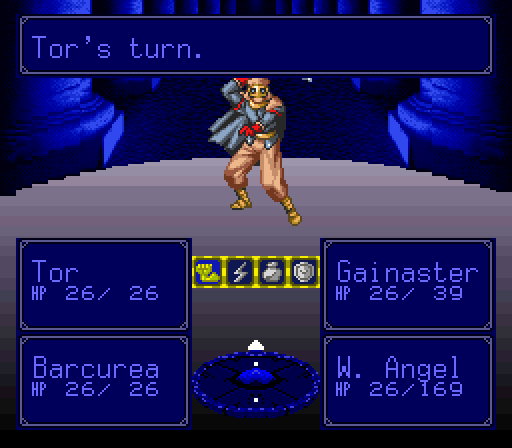
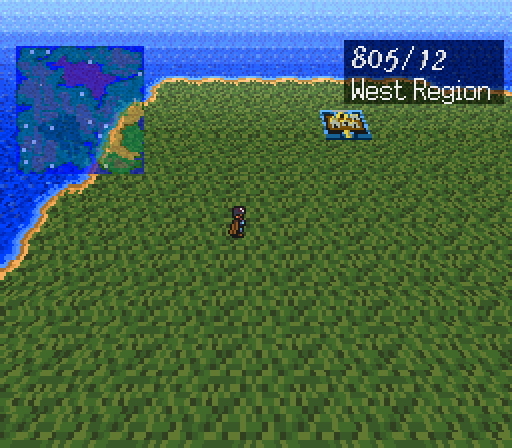
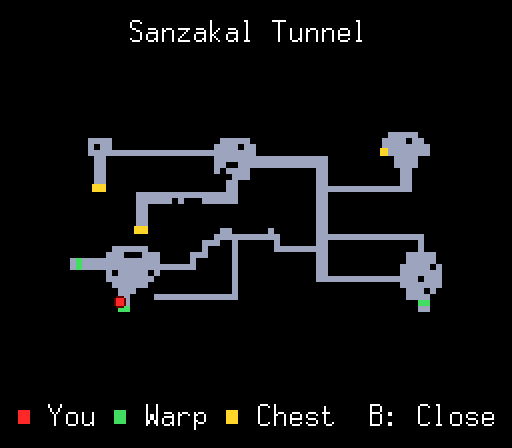
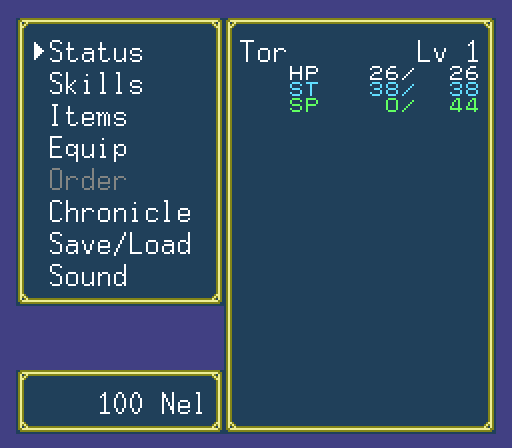
What’s translated
New features
Dungeon map
Stand still in a cave, mine, forest, ship or ruin (77 areas) and press SELECT: you see every path you can reach, the exits in green, unopened chests in yellow and yourself as a blinking red dot. Opened chests disappear from it. Press B or SELECT to close.
Proportional English font
A new variable-width font in the dialogue box, so full sentences fit without abbreviations. Names in battle and menus use the game’s own pixel style.
A readable World Chronicle
The History and People screens were laid out again for English, so you can follow how each of your choices rewrites the timeline.
Clearer battle panels
Party panels sit at the bottom of the screen with the damage numbers on them, and the skill menu shows the two schools, Za and Ge, by name.
Controls added by the patch
| WHERE | BUTTON | WHAT IT DOES |
|---|---|---|
| Caves, mines, forests, ships, ruins | SELECT | Open the dungeon map (stand still first) |
| Dungeon map | B SELECT | Close the map |
How to patch
- Get a clean Japanese ROM. You need your own dump of Granhistoria: Genshi Sekaiki (Japan) (Rev 1): 2 MB, no copier header. Check it before patching:
CRC32 27EB2CF0SHA-1 d75bf1b46b8ac90e773ddf20e3e8abd38f0d4dc5
If the file is 2,097,664 bytes it has a 512-byte header; remove it first (Rom Patcher JS can do this for you). The first release (Rev 0) is a different ROM and won’t patch. We can’t share ROMs, so please don’t ask. - Download and unzip the patch. Inside is
Granhistoria (English) v1.6.bpsand a readme with the version history. - Apply the BPS. The easiest way is Rom Patcher JS in your browser: choose the ROM, choose the .bps, click Apply patch. On desktop you can also use Floating IPS (Flips). BPS checks your ROM first and refuses the wrong one.
- Check the result. The patched ROM is 2,457,600 bytes (2.34 MB): it was expanded only as much as the English text and the new screens need.
CRC32 EF0F9418SHA-1 692c658730c36668437c82f4437bdf64d7b5252a - Play. Tested in Mesen and Snes9x. Other accurate emulators (bsnes, ares) and flash carts that run expanded LoROM games should work too.
Updating from an older build? Always patch a fresh copy of the clean Japanese ROM, never a ROM you already patched. Your in-game save (.srm) carries over; emulator save states made with older versions may not.
What’s new
v1.6 (October 19, 2026)
- Items menu: moving to the second page of the item list no longer leaves old counts and arrows on screen.
v1.5 (October 18, 2026): thanks to a player who sent detailed bug reports with screenshots, this update fixed:
- World map: the date and region box in the top-right corner is now in English (for example
805/12, Asashina, East Region). - Status screen: a long armor name (such as Ringmail) no longer leaves a letter next to Life when you switch pages.
- Shop, Sell list: the window is wider, item counts no longer run into the names or the scroll arrow, and no stray numbers are left behind when the list scrolls.
- “Sell this?” box: Yes and No no longer wrap onto the wrong line.
- Battle: the damage popup on the right-hand party boxes now sits exactly like on the left-hand ones.
- Item names in menus: the 16 longest item names are shortened in menus, shops and battle lists (for example W. Pill, M. Sutra, St. Pill) so the count always has room. Dialogue still uses the full names.
- Smaller ROM: 2.34 MB instead of 4 MB. The expansion now uses only the space it needs.
Known issues
- The dungeon map only exists in dungeons. Towns, houses and the world map don’t have one.
Found a typo or a line that reads oddly? Leave a comment below with where it happened (a screenshot helps) and it’ll be fixed.
Guides for this game
We also wrote a full English guide that uses the same names as the patch:
- Complete walkthrough: every year from 805 to 825, with maps, all 75 chests and every choice
- Missables & choices: everything you can lose for good, and when
- World Chronicle guide: every history entry and both endings
- Secrets & cut content
FAQ
Is the translation complete?
Yes. Every line of dialogue the game uses, every menu, every battle message and the whole World Chronicle are in English.
Which ROM do I need?
The Japanese Rev 1 ROM with CRC32 27EB2CF0, without a header. The BPS file refuses any other ROM, so if patching fails, check your ROM first.
Why is the patched ROM bigger than the original?
English takes more space than Japanese, and the new map screen needs room too. Since v1.5 the ROM grows only by what that needs: from 2 MB to about 2.34 MB (earlier versions were padded to 4 MB).
Why are some item names shortened, like “W. Pill”?
Item lists show two columns with a count after each name, and the screen has no room for longer names. In menus, shops and battle lists the 16 longest names are shortened so the count never touches the name. Dialogue and the guides use the full names (Water Pill, Maha Sutra and so on).
Can I upload the patch to another site?
Not without permission. Please share the link to this page instead, so everyone gets the latest version. If you’d like to host or mirror it, email gametranslate.us@gmail.com. Pre-patched ROMs must never be shared: the game itself still belongs to Banpresto.
Sharing & redistribution
⚠️ Please don’t re-upload this patch
This patch took months of translation and ROM hacking. To keep one up-to-date, safe copy for everyone:
- Do not upload the patch file (or a pre-patched ROM) to any other website, file host, forum, Discord server or ROM site without written permission from Game Translate.
- Do link to this page instead. Sharing the link is always welcome, and it means people get the latest version and the install guide.
- Don’t sell the patch, put it behind a paywall, or bundle it with ROMs, repro carts or any paid product.
- Videos, streams and let’s plays are welcome. A link back to this page in the description is appreciated.
Want to host or mirror it, or include it in a collection? Just ask at gametranslate.us@gmail.com. We usually say yes.
Credits
Translation, ROM hacking & tools: belfallen (Game Translate)
Original game: © 1995 Banpresto / J-Force
v1.6 · October 19, 2026 · bug-fix update · first released October 3, 2026
Enjoying Granhistoria in English? This patch is free and always will be. If it let you finally play it, a coffee helps fund the next translation.
⬇ Download patch v1.6ZIP · 126 KB · freeStuck on the ad page? Read the download guide.
Ivan DonatorBug Slayer
Hi there!
I am writing back to give you a quick update and report a new issue found in v1.5.
First of all, I wanted to send a huge thank you for how fast you fixed everything! I checked the overworld map and the location/date names are now fully corrected and looking amazing. Your speed and dedication to this project are incredible!
Regarding the bug fixes, the scrolling text residue issue is now perfectly fixed inside the shop menus and during battles. However, the exact same visual glitch still triggers when viewing or using items from the main menu while in towns or on the overworld map.
Here is the report for this remaining issue:
Bug Report: Item Menu Text Residue / Ghost Numbers during Scrolling (Overworld & Towns)
• Description:
When opening the main menu to check or use items outside of battle (in towns or on the overworld map), scrolling down from the first page (slots 1–16) to the second page (slots 17–32) leaves “ghost” text residue. The quantity numbers and the scroll arrow indicators do not refresh or clear properly, remaining permanently rendered over empty slots or other text.
I initially suspected this was an issue with item names exceeding a specific character limit. However, as seen in the screenshots, the text residue remains on screen even for items with a single-digit quantity (like “1”), completely independent of name length.
The glitch happens universally during the page-scroll transition regardless of quantity layout.
This seems to be the exact same rendering bug that you successfully fixed for the shop and battle menus; it just needs to be applied to the item sub-menu within the main exploration layout.
• Where it happens:
Inside the main menu’s “Items” screen while exploring towns or the Overworld map.
• Steps to reproduce:
1. Open the main menu while on the overworld or inside a town.
2. Open the “Items” screen.
3. Scroll down past the first 16 items to access the second page of inventory.
4. Observe the right side of the screen where numbers and arrow tiles remain stuck.
(Note: I have attached screenshots showcasing how the screen completely fails to clear the text tiles when scrolling to the second page of items).
Also don’t know if this a feature or not but…
(though not a bug itself), the game allows players to carry more than 99 of the same item by splitting them into separate slots (e.g., a slot with 99 and another with 1)
Thank you once again for your incredible work on this patch!
Game Translate Author
Thank you for checking v1.5 so quickly, and for the clear screenshots again!
You were right: the Items screen in the main menu had the same problem as the shop list. Each row was cleared one cell short, so the last digit of the counts (and the arrow) stayed behind when the list moved to the second page. That’s fixed in v1.6, which is now up on this page. Your saves carry over; just patch a fresh copy of the clean ROM.
About carrying more than 99 of one item: that’s how the original game works. Each inventory slot holds up to 99, and anything beyond that goes into a new slot. The patch doesn’t change any item logic, so it behaves the same as the Japanese version.
Thanks again, and keep the reports coming if you find anything else!
Ivan DonatorBug Slayer
Bug 5: Incorrect Damage Black Box Width on 3-Digit HP Values (Battle Position 2)
Description:
There is a minor aesthetic layout bug during battles. The battle screen layout places party members in a grid: slots 3 and 4 are on the top row, while slots 1 and 2 are on the bottom row. When a character assigned to position 2 (bottom right) has a 3-digit total HP value (100+) and takes damage, the black background box that generates behind the HP numbers during the hit animation does not stretch completely. It only covers 1 or 2 digits instead of expanding across all 3 numbers like it correctly does for positions 1 and 3.
Note: I haven’t had a 4th party member yet to test if position 4 (top right) suffers from this same layout issue.
Where it happens:
Inside the Battle Screen interface.
Steps to reproduce:
1. Have a party with multiple characters and place one in position 2 (bottom right).
2. Ensure the character in position 2 has a 3-digit HP value (100+).
3. Enter a battle and let an enemy attack the character in position 2.
4. Observe the black background box that pops up behind their HP numbers during the damage animation.
Observed behavior:
The black background box is too small and fails to span across all three digits of the HP value for the character in position 2.
Note: Please accept my apologies for splitting this into multiple comments. The website has a limit of 3 attachments per post, so I had to send the screenshots in separate chunks to show all the bugs. Thank you for your understanding!
Game Translate Author
Thank you so much for taking the time to document this issue in such detail! I really appreciate the clear explanation, reproduction steps, and screenshots. They make it much easier for me to identify what’s going wrong.
I’m currently investigating this bug and will work on getting it fixed as soon as possible. I’ll also check position 4 to see if it has the same issue.
And please don’t apologize for posting multiple comments! I genuinely appreciate all the effort you’ve put into testing the game and reporting these issues. Your detailed feedback is incredibly helpful in improving the translation patch.
Just one small request for next time: could you please post any future bug reports directly in the game’s translation patch post rather than in the Requests section? I’ve already moved your comments to the correct patch post to keep everything organized and easier to track. No worries at all, and thank you for understanding!
Thanks again for your patience, support, and all the time you’ve spent helping make this patch better!
P.S. I noticed you gave the patch 3.5 stars, and I have to admit, it made me a little sad! 🥹 But I completely understand, and I truly appreciate your honest feedback. I’m putting a lot of love and effort into this project, and your detailed bug reports are helping me make it better. I’ll do my best to fix these issues and improve the overall experience. Hopefully, once the patch is in better shape, you’ll feel it’s worth a higher rating! That would really mean a lot to me. 😊❤️
Ivan DonatorBug Slayer
Bug 3: Shop Menu Text Overflow and Residual Ghost Numbers during Scrolling
Description:
In the shop’s “Sell” menu, items with names that exceed 11 characters (like “Water Pill” or “Earth Pill”) cause a formatting overflow with their quantity numbers. When scrolling down past these items, the numbers (and scroll arrows like “v”) do not refresh or clear from the screen, leaving “ghost” text residue floating over empty slots or other text.
Note: This visual glitch gets corrected immediately if you scroll back up to the top or completely exit the shop menu.
Where it happens:
Inside any Shop screen under the “Sell” menu.
Steps to reproduce:
1. Have multiple items in your inventory, including items with names longer than 11 characters (e.g., “Water Pill”, “Earth Pill”).
2. Go to a shop and select “Sell”.
3. Scroll down past the long-named items.
4. Observe the right side of the item list window.
Observed behavior:
The numbers and arrows from the previous items remain permanently rendered on the screen even when the item slots are empty or changing.
Expected behavior:
The shop menu text tiles should clear completely when scrolling so that old numbers do not overlap or linger on screen.
Bug 4: Text Wrapping Issue in the Shop Confirmation Box (“Sell this?”)
Description:
When selecting an item to sell, the confirmation box prompt “Sell this? Yes / No” has a text wrapping issue. The letter “s” from “Yes” is cut off and pushed down to the next line on the left side of the box.
Where it happens:
Inside the shop interface when confirming a sale.
Observed behavior:
The confirmation layout breaks, rendering a lonely “s” below “Sell this?”.
Expected behavior:
Ivan DonatorBug Slayer
Bug 2: Text Residue / Rendering Glitch on the Character Status Screen
Description:
When switching tabs inside the “Status” menu, if an equipped item name is long (more than 8 characters, like “Ringmail”), its last character remains permanently rendered on screen after toggling to the next tab. The trailing letter gets stuck right next to the character’s Life stat values.
Note: This visual glitch gets corrected / cleared immediately if you completely exit the menu or if you switch back to the equipment view tab.
Where it happens:
Inside the main Character Status menu screen.
Steps to reproduce:
1. Equip an item with a long name (e.g., “Ringmail” on the any party member body slot).
2. Open the main menu and go to the “Status” screen to view his equipment.
3. Toggle/switch tabs within the status menu and equipment, to see the page with the character stats
4. Observe the “Life” numerical value line to see the stuck letter.
Observed behavior:
The letter “l” from “Ringmail” remains printed on the screen right next to the current/max life stats (showing up as “56 l”).
Ivan DonatorBug Slayer
Hi there! First of all, thank you so much for your translation of Granhistoria. This is a game I have wanted to play for decades, but as you know, there was never a fan translation until now.
While playing it, I discovered a few bugs. For context, I am playing the English translation patch version Granhistoria-English-v1.3 using the Beetle Supafaust core in RetroArch.
Here is the report for the issues I found:
Bug Report 1: Untranslated Location and Date Names on the Overworld Map
Description:
There are several instances on the overworld map where the text box in the top-right corner remains entirely in Japanese. This includes the date format (e.g., Year/Month) and the specific names of locations/regions when traversing the world map.
Where it happens:
On the main Overworld Map screen.
Observe the information box displayed in the top-right corner of the screen.
The text displays Japanese kanji and katakana/hiragana instead of the English translation (e.g., showing locations like アサシナ, 東部自治区, and ドルーク).
The date format and location names should be fully translated into English.
(Note: I have attached three screenshots showcasing examples of this issue at different map coordinates.)
Thank you again for all your hard work on this amazing project!
Game Translate Author
Hi! Thank you so much for the detailed report and the screenshots. They made every one of these easy to track down. All five are fixed in v1.5, which is now up on this page:
1. World map: the date and region box in the top-right corner is now in English (for example “805/12” with “Asashina” or “East Region”).
2. Status screen: the stray letter next to Life is gone. The page clear was one cell short for long armor names like Ringmail.
3. Shop “Sell” list: the window is wider, so counts no longer run into the item names or the scroll arrow, and no leftover numbers stay behind when you scroll. To give the counts room, the 16 longest item names are shortened in menus (W. Pill, M. Sutra, St. Pill…). Dialogue still uses the full names.
4. “Sell this?” box: Yes and No no longer wrap.
5. Battle: the black box you saw is the drop shadow of the damage popup. On the right-hand party boxes it was one column off; it now lines up the same way as on the left, across all three digits.
Your in-game saves (.srm) carry over. Just patch a fresh copy of the clean Rev 1 ROM with v1.5. The patched ROM is also smaller now (2.34 MB instead of 4 MB), so if you get a chance, let me know how it runs in Beetle Supafaust.
If you spot anything else, post it here. Enjoy the rest of the game!
Gundamguy
First, thanks for all the english patches, and for them to be delivered so fast!
Since you seem to like SD mecha games, I’d suggest to take a look at, IMO, the most content filled SD games on the PS1.
– SD Gundam Generation F, is the SDGG game with the most content to date, the last one to have the classic SD style, the last one to have the Gundam Sentinel campaing and suits, and the only one to have a versus/skirmish mode against other player or the CPU. There’s also the F-IF expansion with more content.
– Super Robot Taisen Complete, a package that remakes Super Robot Taisen II, Super Robot Taisen III, and Super Robot Taisen EX with the engine and graphics of F/F Final. It also has a versus/skirmish mode against other player or the CPU, mode exclusive to this title.
– SD Gundam G-Century. The last of the classic “Gashapon” series and the one with the most content and eras available. As previous games of this series, there’s multiple game modes.